Sample Blueprint · Muse

A sample Blueprint.This one is for Muse.

A Blueprint is what you hold at the end of the first week: your first release defined, drafted and planned, with its launch date. Here is a full one, written for Muse, one of the products on the home page.

About this sample

Muse is live at muse.img.pro. It had no client, so this is written the way yours would be: as the plan for a first release, before any code exists. The screens, the stack, the plans and what each image costs to make are the real ones. The Build price, the dates and the schedule are examples that follow the standard terms.

Product
Muse
Platform
Web
Fixed price
$25,000
Launch
5 February 2027
Blueprint 0.1 · Muse01 / 04

The release.What gets built first.

Muse is a moodboard that makes new images in your style.

You add images you love. Muse works out what they share and makes new ones. You never write a prompt.

For

People who already have images that belong together: a collection, a photoshoot or a moodboard. They want more images in that style, and they don't want to learn prompting to get them.

The one thing it does well

It makes new images in your style, on its own.

You add three images. The first new ones usually arrive within minutes, and after that about one a day. You look at each one and keep it or pass. Only the images you add set the style. The ones Muse makes never feed back in, so the style stays yours.

In this release

References
Add images by upload, drag and drop, or a pasted link. Three are enough to start.
Automatic images
About one new image a day, with no prompt. Muse waits for you to review one before it makes the next.
Keep or pass
One image at a time, full screen. Kept images go to your board. Passed images can be brought back for seven days.
The board
Everything you kept, in one place. Open any image and download it.
Images on demand
On the paid plans, make a new image whenever you want. One tap, still no prompt.
Settings
Image quality, image shape, and whether new images include people.
A launch page
The page that explains Muse and takes sign-ups.

The plans

  • Free

    $0

    Automatic images, at Low quality.

  • Personal

    $10 a month

    Images on demand. Standard quality.

  • Studio

    $29 a month

    More images on demand. High quality.

Both paid plans start with a seven-day trial, which needs a payment method.

Not in this release

A prompt box
Not later either. Never writing a prompt is the product.
An iPhone app
The web app works on a phone. A native app is a second platform.
More than one board
One board is enough to learn whether people come back.
Share links
People can download what they keep. Sharing a whole board can wait.
Email when images arrive
The first thing to add after launch.
Team accounts
Muse starts as a tool for one person.

About this sample

Muse has three of these today: more boards, share links and email. Each one was added after launch.
Prepared by Cristian Castillomoshi.co
Blueprint 0.1 · Muse02 / 04

Key screens.The product, before it exists.

Four screens carry the first release. If these four work, the product works.

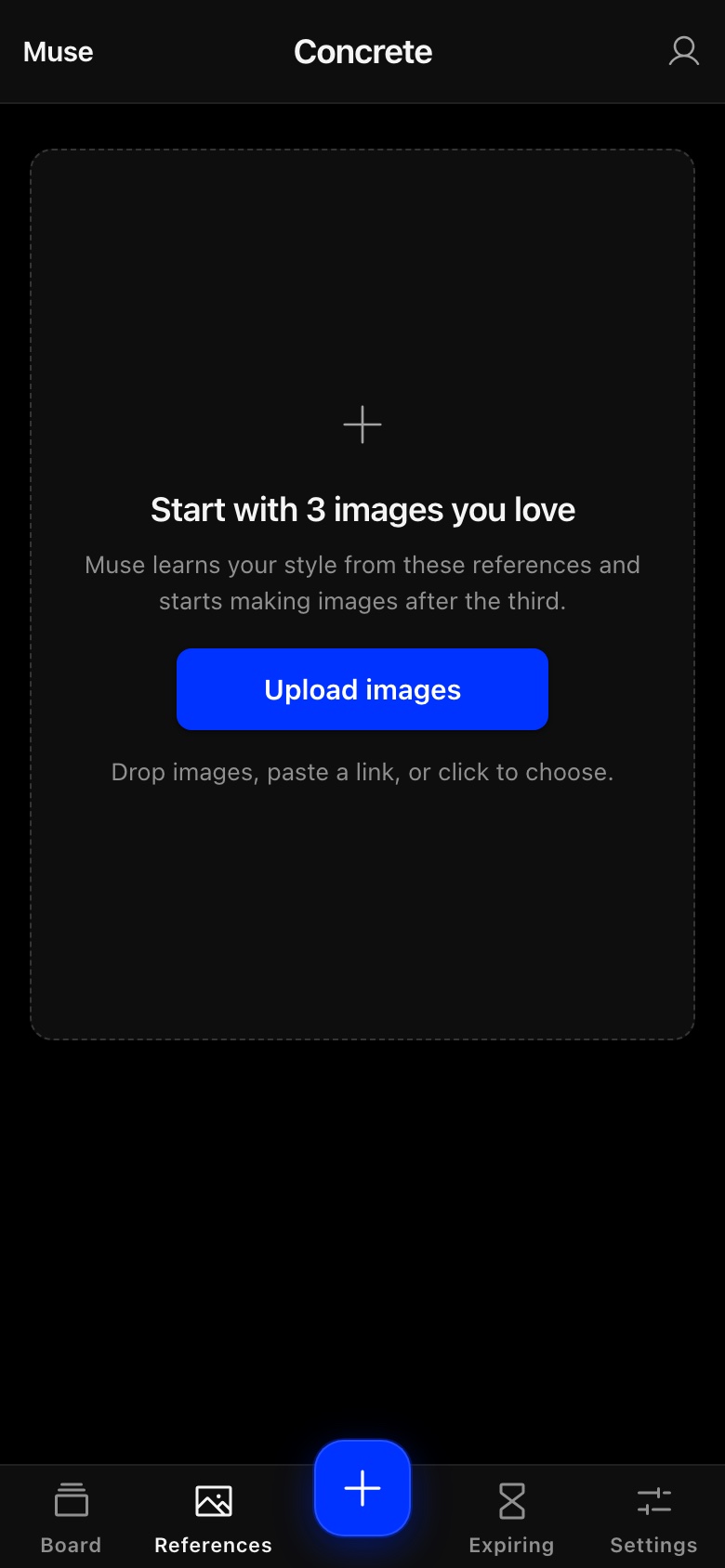
  1. Muse on a phone, with an empty board. A panel reads: Start with 3 images you love. Below it, an Upload images button.

    Start

    Add three images

    The whole setup. Upload them, drop them in or paste a link.

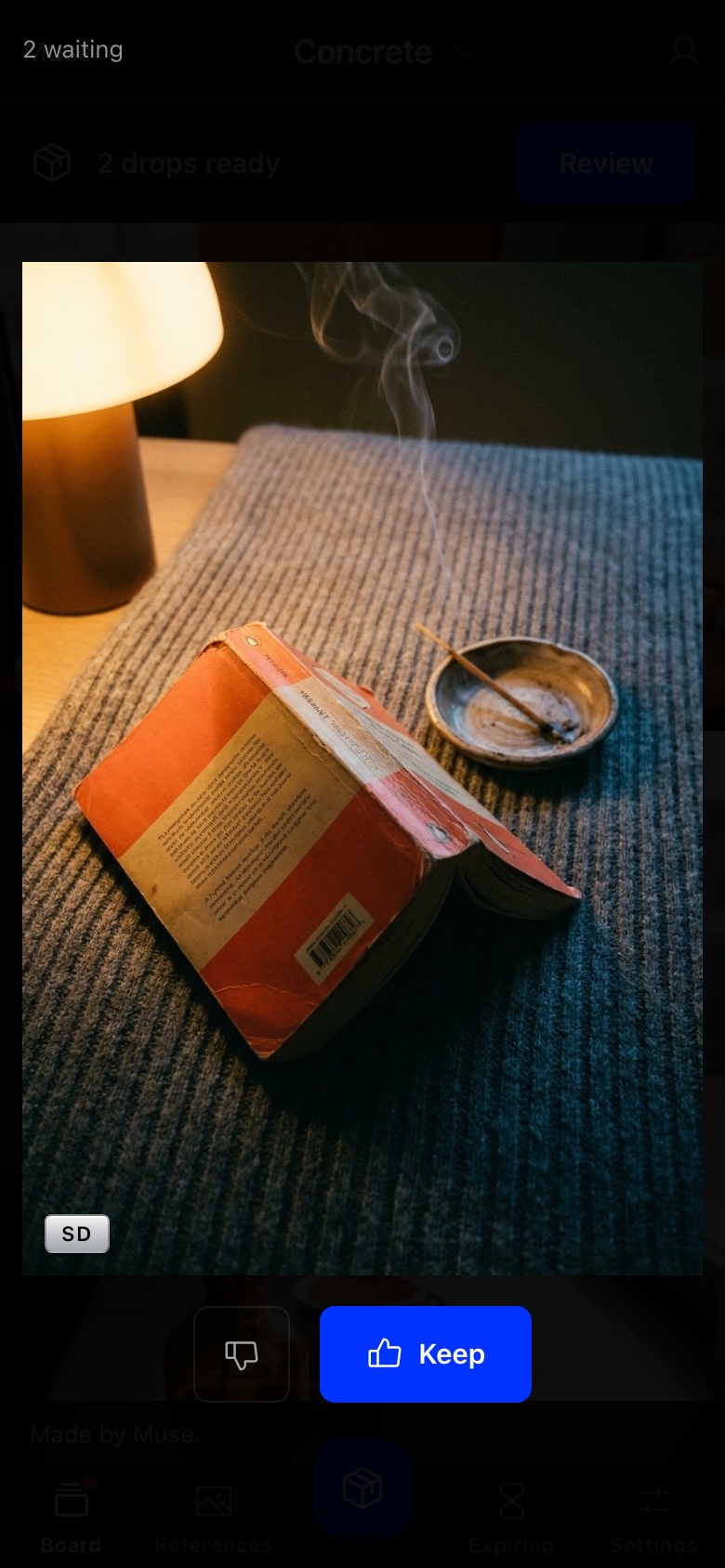
  2. Muse on a phone, showing one new image full screen: a paperback and an incense dish on a wool blanket. Below it, a pass button and a Keep button.

    The one thing

    Keep or pass

    One new image at a time, full screen, with two buttons.

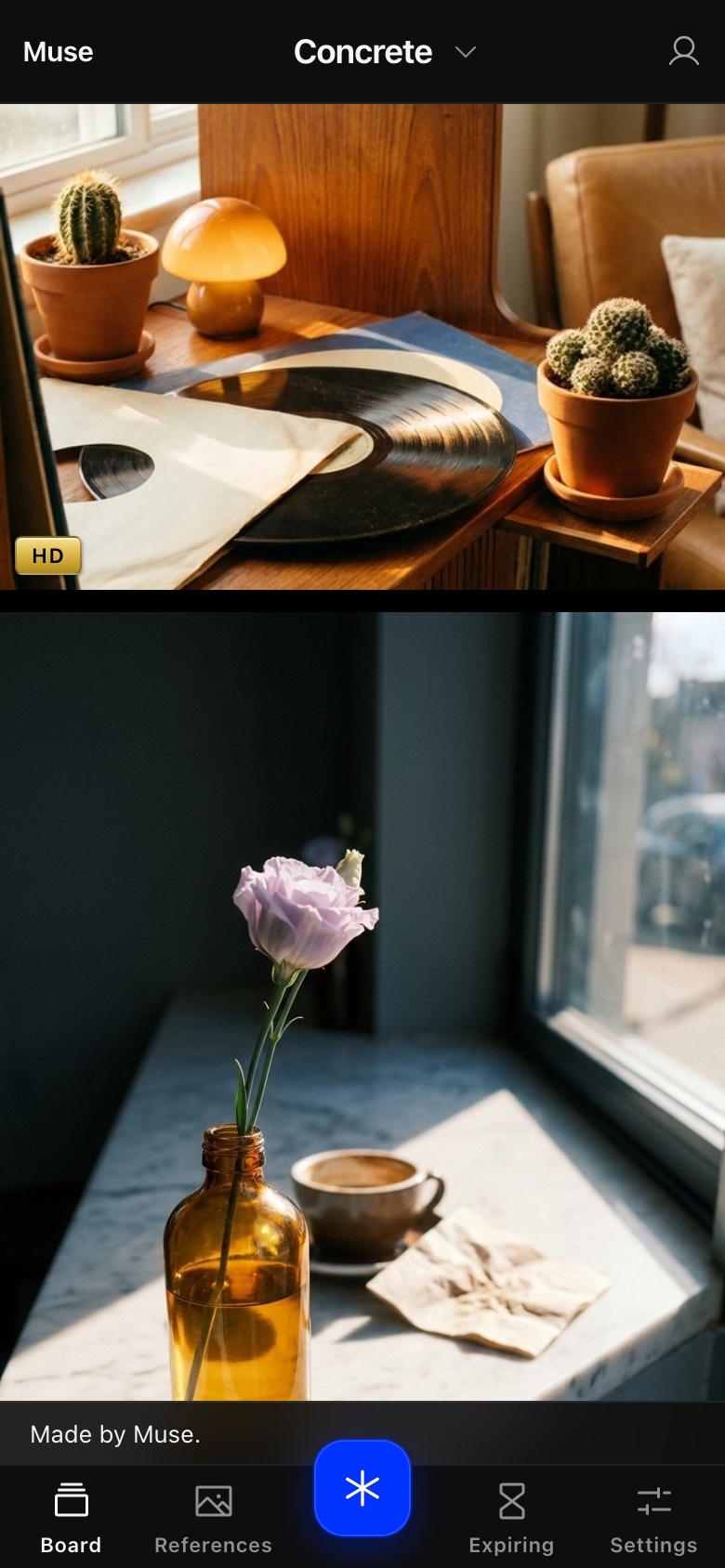
  3. Muse on a phone, showing the board: two kept images, a record on a wooden desk and a flower in a glass bottle by a window.

    The board

    What you kept

    Every image you kept. Open one to download it.

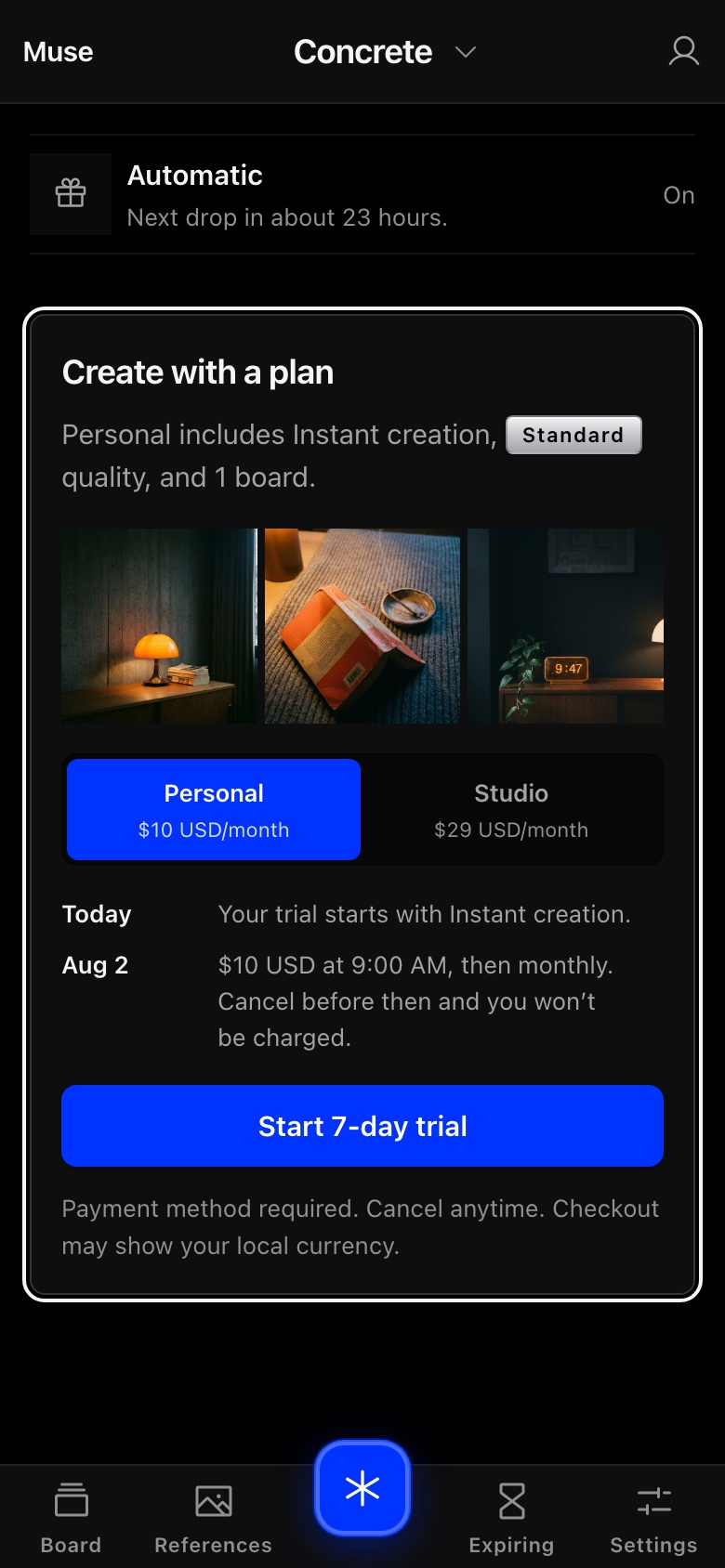
  4. Muse on a phone. A row reads: Automatic, next drop in about 23 hours. Below it, a card offers Personal at $10 a month or Studio at $29 a month, with a Start 7-day trial button.

    Payment

    Choose a plan

    Automatic images keep arriving for free. A plan adds images on demand, after a seven-day trial.

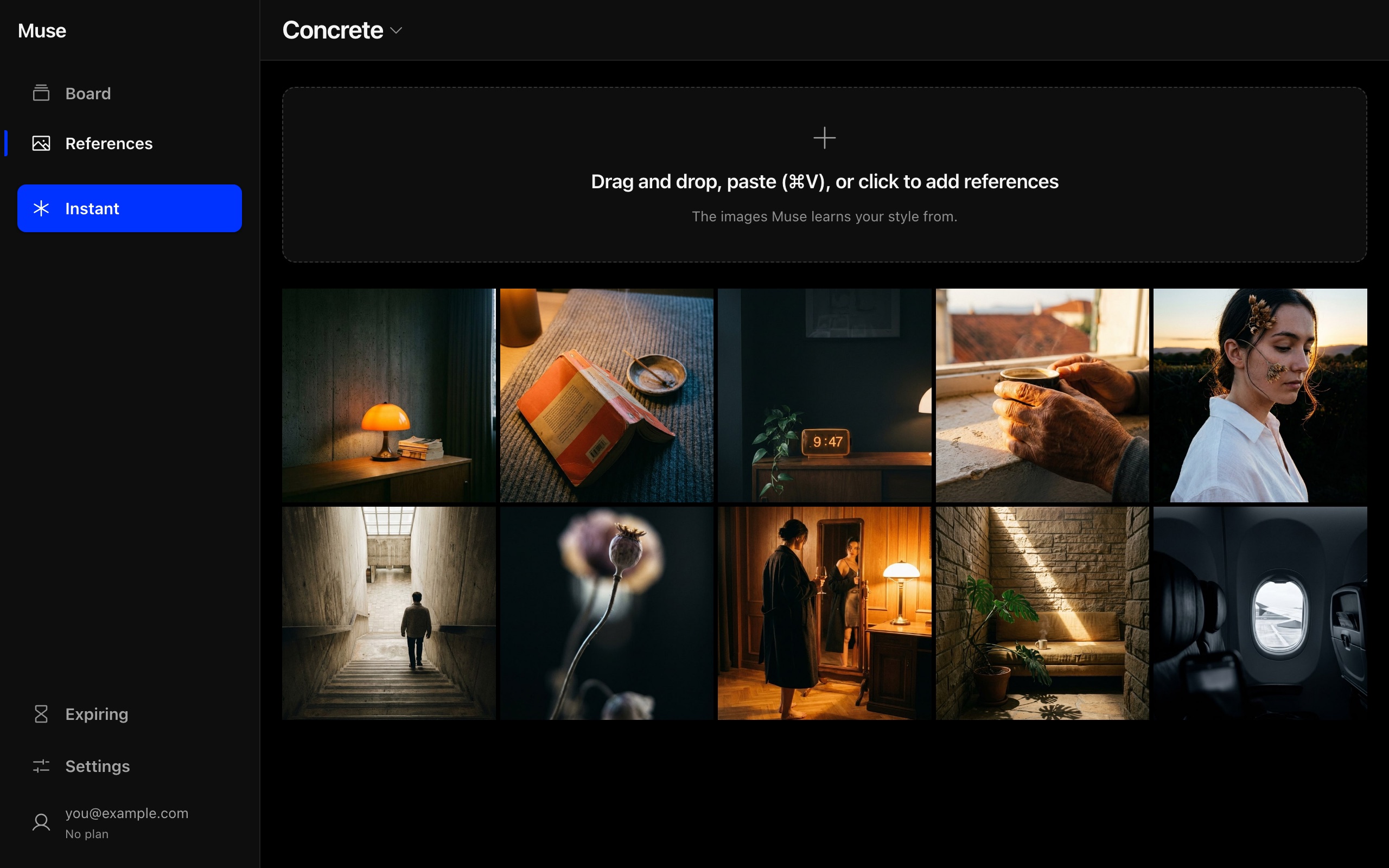
Muse on a laptop, showing the References screen: a grid of ten images under a panel that reads Drag and drop, paste, or click to add references.
The same app on a laptop. This is References, where the images you add live.

About this sample

These are Muse's own screens, as it runs today. In your Blueprint, this page holds the designs for your product.

Prepared by Cristian Castillomoshi.co
Blueprint 0.1 · Muse03 / 04

Technical plan.How it's built, and what it costs to run.

How it gets built

Platform
Web. One app that works on a phone and on a laptop, with no app store in the way.
Code
TypeScript on Cloudflare Workers. One Worker serves the launch page, the app and its API.
Data
Accounts, boards and the record of every image go in Cloudflare D1, a SQL database. The images themselves are stored and delivered by img.pro.
The daily image
A schedule checks every minute for boards that are due. Each image is its own job in a queue, so one failure can't hold up the rest.
Spending limits
Muse makes the next automatic image only after the last one is reviewed. Each account has a daily ceiling, and so does the whole app.
Releases
Two copies: a test site and the live one. Automated tests run on every change, and every change goes to test first.

Outside services

img.pro
Sign-in, image storage and delivery, and checkout. Payments go through Stripe: card, Apple Pay or Link.
Google Gemini
Makes the images. One model for each quality: Low and Standard at 1K, High at 2K.
Anthropic Claude
Studies the images you add, then writes the brief for each new image.

Muse's first release depends on these three.

Running cost per month

Fixed
Cloudflare WorkersHosting, the database, the queue and the schedule.$5.00
img.pro ProSign-in, image storage and delivery, and checkout, for the whole app.$29.00
Before any customers$34.00
Per account, at most · one automatic image a day
FreeLow quality, $0.034 an image.$1.02
PersonalStandard quality, $0.071 an image.$2.13
StudioHigh quality, $0.139 an image.$4.17
Example month
200 people who review every day100 on Free, 80 on Personal and 20 on Studio. Automatic images only.$355.80
Fixed$34.00
Total$389.80

The price of an image covers Gemini making it and Claude writing its brief. Images made on demand cost the same each, and every plan's allowance caps them. An account that stops reviewing costs nothing, because Muse waits.

Every account is in your name, and each provider bills you directly.

About this sample

The per-image prices are the ones Muse is planned and capped with. The example month is an illustration, not Muse's own numbers. Muse uses img.pro for sign-in, storage and checkout. Your product would use providers in your own accounts, such as Stripe for payments.

Prepared by Cristian Castillomoshi.co
Blueprint 0.1 · Muse04 / 04

Schedule and date.In writing. No ranges.

Launch date

Friday5 February 2027

Build starts Monday 11 January. Four weeks, with an update every week. The date moves, day for day, only when something I need from you is late, or when an outside service keeps us waiting.

Week by week

  1. Week 111 JanSign-in, references and image storage. The style engine, with first images from real references.
  2. Week 218 JanThe daily schedule, keep or pass, and the board.
  3. Week 325 JanImages on demand, settings, plans, the trial and checkout. Working product in your hands on Friday 29 January.
  4. Week 41 FebThe launch page, spending limits, and testing on phones and laptops. Launch on Friday 5 February, then handover.

Your part

Replies
Within two working days, from the start to launch.
By Monday 4 January
Stripe, activated in your business name, for the paid plans.
By Friday 8 January
Access to your domain's DNS, a Cloudflare account for hosting, and a code repository on GitHub.

How you pay

  1. Start · 11 Jan

    $10,000

    When we start. With this Blueprint's $2,500 off, $7,500.

  2. Test · 29 Jan

    $10,000

    When the working product, with accounts and payments, is in your hands to test.

  3. Launch · 5 Feb

    $5,000

    At launch. Waived if I miss the date and the cause is on my side.

Fixed price

$25,000

For the first release as this Blueprint defines it: one platform, one thing done well, and the outside services on page 03. That is a standard first release, at the standard price.

Included

  • The design, and a working visual identity
  • The working product, with accounts, payments and the outside services on page 03
  • The launch page
  • Testing and release
  • All the code and every account, in your name
  • Thirty days of fixes after launch, until 7 March

What would change the price

Nothing this Blueprint lists as in the release. A second platform, such as an iPhone app, adds $20,000 and one month, built after this one on its own dates and payments. Anything it doesn't list, such as the items under "Not in this release" or another outside service, gets its own fixed quote, or goes on your list under Beyond after launch.

After this, it's your call

  • Go ahead with the Build

    At the price and dates on this page. Take the 11 January start and the $2,500 comes off.

  • Take it elsewhere

    It's a plan any good team can build from.

  • Stop there

    Better to find out in a week than in six months.

Cristian Castillocristian@moshi.co

Prepared by Cristian Castillomoshi.co

Open for bookings

Get this for your product.

By the end of your week, your product has all four. Money-back guarantee: a full refund, no questions, until 7 days after you receive it.

Blueprint: one week · $2,500